SOGo API Rest
Here are described all the rules and definitions applying to SOGo API Rest
URI, Resource, Collection and Action
What is a Resource?
The key abstraction of information in REST is a resource. Any information that can be named can be a resource: a document or image, a temporal service (e.g. "today’s weather in Los Angeles"), a collection of other resources, a non-virtual object (e.g. a person), and so on. In other words, any concept that might be the target of an author’s hypertext reference must fit within the definition of a resource. A resource is a conceptual mapping to a set of entities, not the entity that corresponds to the mapping at any particular point in time
A resource is a name that can either be:
-
Directly the content:
/document.txt -
A partial representation of the content:
/12578, 12578 being the id of a mail -
A map to a resource:
/0, 0 being an account
What is a Collection?
A collection is a set of the same kind of resources and can also have actions, to represent that, the plural is used on the collection’s name
api/v1/mailboxes mailboxes is a collection of mailbox
The part just after a collection can be a resource or an action:
/api/v1/mailboxes/{mailbox_id} mailbox_id is a resource of the collection
|
A collection can be a singleton, only having one resource. In that case, the endpoint is singular and sufficient.
|
They can be subcollections
/api/v1/mailboxes/{mailbox_id}/folders
A collection also can only have a set of actions and no resources:
/api/v1/auth/login
/api/v1/auth/logout
What is an Action?
An action is a name that represents a function, a method that will be executed. It can depend on a collection:
-
/api/v1/auth/login:authis a collection of different actions related to the authentication -
/api/v1/admin/rename-user:adminis a collection of different actions related to the admin tools (ex: sogo-tool)
It can depend on a resource:
-
/api/v1/mailboxes/{mailbox_id}/folders/{folder_id}/purge:foldersis a collection of different resources.purgeis an action on those resources
Actions can only read data, in that case, the GET method will be used. If they modify data, POST will be used instead.
URL Syntax rules
Only use the following for naming your collections and actions:
-
Latin alphabet lowercase:
abcdefghijklmnopqrstuvwxyz -
hyphen (-) to separate the words.
Resources don’t have any limitations as they can be directly a resource name. ( /my_file@@@ext.pytz). But try your best to keep it with alphanumerical only.
| Underscore visibility in some software makes it a worse choice than hyphen |
Endpoints must not end by a slash (/)
|
If an endpoint is defined with a |
Methods allowed
GET
-
On a resource: Fetch the resource.
-
On a collection: Fetch all the resources.
-
On a singleton: Fetch the resource.
-
On an action: Get the result of the action.
GET methods must be safe, meaning it only reads data, it does not update, modify or delete them.
POST
-
On a resource: Method not allowed.
-
On a collection: Create a resource if it does not exist.
-
On a singleton: Create a resource if it does not exist.
-
On an action: Execute the action.
Data given must contain all the required arguments to execute the method.
Data must be a JSON with the header Content-Type: application/json
PATCH
-
On a resource: Update the resource.
-
On a collection: Method not allowed.
-
On a singleton: Update the resource.
-
On an action: Method not allowed.
The data given merged with the resource stored must be
enough to make a viable resource.
Data must be a JSON with the header Content-Type: application/json
The JSON is expected to be JSON Merge Patch. Meaning that the following data sent by a PATCH request:
{
    "PARAM1": value1,
    "PARAM2": null
}
It will update the value of PARAM1 to value1, and remove PARAM2
|
If a patch remove a parameter that has a default value, the result will have the default value. |
|
PATCH is not meant to delete, meaning that if you send a json-merge-patch that removes everything, the request will fail (400 Bad Request) |
|
Use the method merge_path from app/utils/dict.py |
PUT
|
Use PATCH to update a resource instead of PUT Except if your endpoint purposely doesn’t allow partial update. In that case, the endpoint will have the PUT method but not the PATCH. |
-
On a resource: Update the resource.
-
On a collection: Method not allowed.
-
On a singleton: Update the resource
-
On an action: Method not allowed.
POST, PATCH data
The data must be in JSON format and set the header Content-Type: application/json.
If the header is missing or incorrect, or if the data are not JSON, an error is returned 400 Bad Request
The JSON must use snake_case for their keys.
When creating or modifying a resource:
|
Resource can have:
For case 1 there is no problem. POST must give everything. PATCH that tries to remove a required parameter will fail as the merged resource is not viable anymore. For case 2, this is the same logic as case 1 For case 3, your implementation must check itself that there is at least one parameter at the end as the Marshmallow [see the part of the doc that speaks about that] schema will not detect any errors. |
POST, PATCH response
DELETE
-
On a resource: delete the resource.
-
On a collection: method not allowed.
-
On an action: method not allowed.
The resource deleted must be in the URI. Any data, query or body, sent are not processed.
DELETE must not return any content if it succeeds, shown by the status: 204 No Content
Batch Action
If a resource A has several resources B, any action on several resources B should be implemented at resource B level.
The action’s name should start with batch to make it clear.
Reminder that actions are executed with a POST request.
|
Take the endpoints for calendars and events:
DELETE on To delete several events from a calendar, implement: POST |
Summary of endpoints:
-
/api/v1/../collections: GET: all resources, POST: create a new resource, PUT: Ensures a resource exists with specified value -
/api/v1/../collections/{resource_id}: GET: the resource, PATCH: update the resource, DELETE: remove the resource -
/api/v1/../collections/{resource_id}/action-name: POST: Action on this resource different from PATCH or DELETE -
/api/v1/../collections/action-name: POST: Action on the collection
Code status
|
Here are given the common status codes. If in your development you think about another status code that would be useful, open the discussion. |
| Status | Name | Description |
|---|---|---|
200 |
Success |
GET: The resource has been properly fetched |
201 |
Created |
POST: The resource has been created |
202 |
Accepted |
POST: Action is asynchronous and has been accepted |
204 |
No Content |
DELETE: the resource has been deleted |
400 |
Bad request |
The request does not have the required fields, or the fields the request has are invalid in some way. |
401 |
Unauthorized |
The request has invalid credentials, or no credentials when credentials are required. |
403 |
Forbidden |
The request or action is not allowed. |
404 |
Not Found |
The resource is missing or the endpoint does not exist. |
409 |
Conflict |
Used in POST request if the resource already exists. |
412 |
Precondition Failed |
Some conditions are not satisfied to allow the request |
500 |
Internal error |
The server has encountered an unexpected error |
API response format
All responses are in JSON format and they all have the same basic structure, for all status codes except 204 No Content where there is no body in the response.
{
    "error_msg": "Describe the error if any",
    "error_code": "SXXXXXXX",
    "data": "actual data of the request"
}-
If the code status is
2XX, data contains the actual JSON structure expected by the request. error_code is S000000 and error_msg is an empty string. -
Else if 4XX or 5XX, data is
nulland:-
"error_code": A string, representing an error. Defined in app/utils/errors.py
-
"error_msg": A readable message of the error.
-
Having a common response structure will help Interceptors to properly parse the response if needed.
|
We called 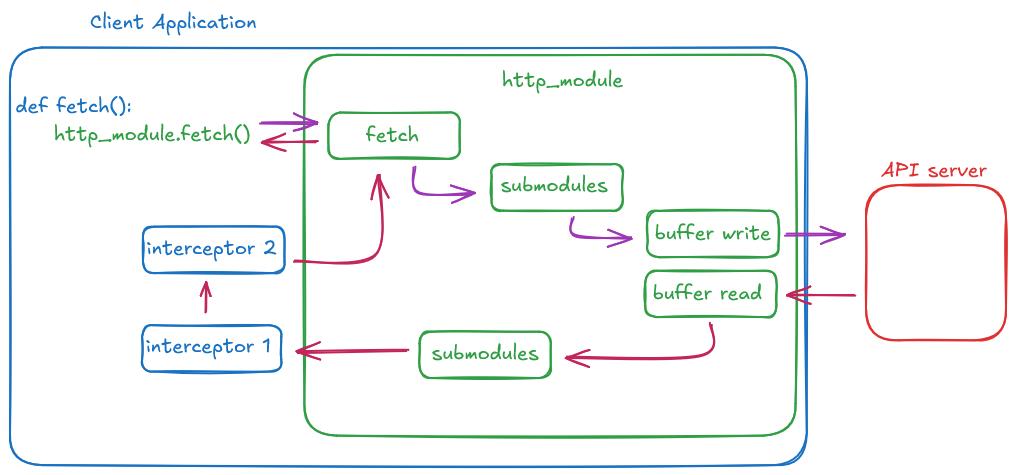
|
Authentication
Only a few endpoints (login and param needed before login).
See SOGo API Authentication for more details.
Pagination, Sorting, Filtering
|
Collections which we know can have a lot of mandatory implements pagination. On those collections:
If a collection, that does not have pagination, appears to need one in the future, a new API version of the method will be created, the other one marked as deprecated. |
A decorator has been made to handle pagination, sorting and filtering query and response.
custom_paginate from app/utils/api/paginate_sort_filter.py
This decorator only checks the query and adds the headers to the response, it does not actually do the paging, sorting and filtering.
-
param int page: page number (default: 1)
-
param int page_size: page size (default: 10)
-
param str sort_by: field to sort by, default None,
-
param str sort_order: order to sort, default to "asc".
-
param str fields: comma-separated list of fields to return, default to "None"
Pagination Query
The query must be like this:
GET /api/v1/collections?page=X&page_size=Y
-
X will surcharge default page, minimum 1
-
Y will surcharge default page_size, cannot be greater than default max_page_size
Pagination response
|
|
The header X-Pagination is set with this json
{
   "total":100,
   "total_pages":10,
   "first_page":1,
   "last_page":10,
   "page":2,
   "previous_page":1,
   "next_page":3,
   "link_next": "/api/v1/collections/page=3&page_size=10",
   "link_previous": "/api/v1/collections/page=1&page_size=10",
   "link_start": "/api/v1/collections/page=1&page_size=10",
   "link_last": "/api/v1/collections/page=10&page_size=10"
}|
link_next and link_previous can be an empty string if this is the last or first page |